Industrial knowledge base with OPAIRS®: From the bill of materials to company knowledge for production, assembly and quotation costing
A part does not fit, assembly stops, and the worker starts searching: in SAP, in PLM, on the network drive, in the mailbox and among colleagues. OPAIRS organises company knowledge along the bill of materials, attaches drawings, changes and e-mails to the right component and reconciles them with the plan. Instead of searching, people get back to working on the product, and with every project the company’s own knowledge base on processes and production workflows grows.
A component does not fit into the assembly. Is the drawing at the workstation still valid? Was there a change, and has it been implemented? Has the replacement part been ordered, and when does the plan need the assembly? Somewhere in the company there is an answer to each of these questions. It just sits in another system, another department or a colleague’s mailbox. Until everything has been pieced together, assembly stands still and the worker is searching instead of finding a solution.
Searching adds no value
How much time this costs was measured by Philipp Steenwerth in his doctoral thesis at Hamburg University of Technology (2023, German). In the assembly area of a high-variety small-batch manufacturer, searching accounted for 24.3 % of the observed time at the assembly island and as much as 74.5 % in order picking. In the assembly work itself, most of it was not a search for material: 71 % of the search effort went into information, almost entirely order information such as the routing sheet. A search function was never used. The thesis also cites productivity analyses from one-off production in which obtaining and processing information took around 30 % of recorded working time, and obtaining material and tools another 19 % or so: https://tore.tuhh.de/dspace-cris-server/api/core/bitstreams/af693a29-870f-4324-8028-ccfbc6d2aba9/content
The problem is growing in the office, too: a study by Büro-Kaizen GmbH found that search time rose from just over 13 % to almost 20 % of working time within ten years – statistically a full day per week, three quarters of it spent on digital search (German): https://www.cetpm.de/fachmagazin_yokoten/2022_Yokoten_Heft_06_News_Bueroeffizienz_am_Sinken_Wachsende_Zeitverschwendung_verschaerft_Fachkraeftemangel_Sabine_Leikep_CETPM.pdf
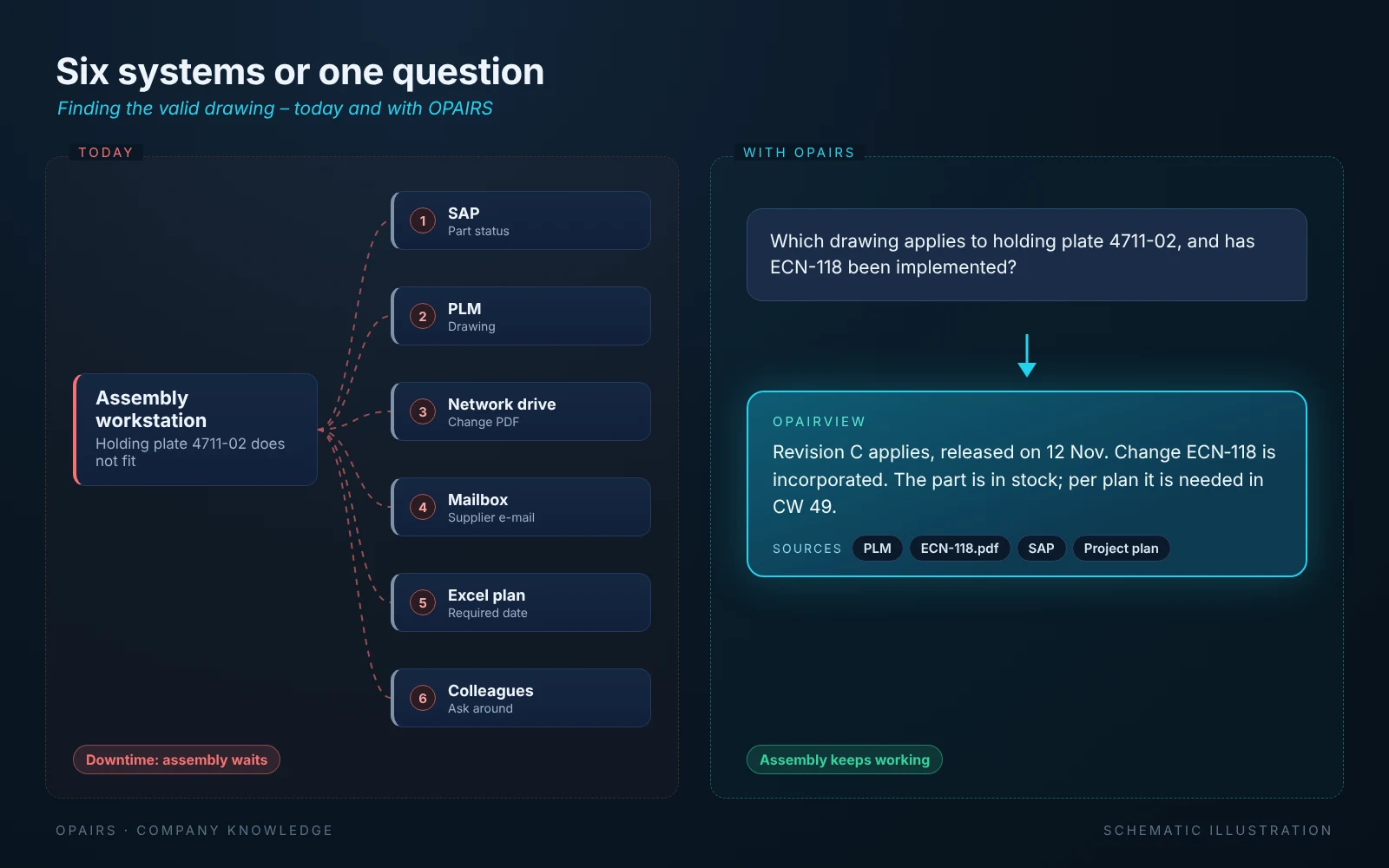
Six systems or one question
At an assembly workstation, the search chain typically looks like this: part status in SAP, drawing in PLM, change PDF on the network drive, delivery date in the supplier’s e-mail, required date in the Excel plan, and finally a question to the colleague who might know. With OPAIRS, the worker asks one question and gets an answer with sources: which drawing applies, whether the change has been incorporated, whether the part is in stock and when it is needed.
The bill of materials as the backbone of company knowledge
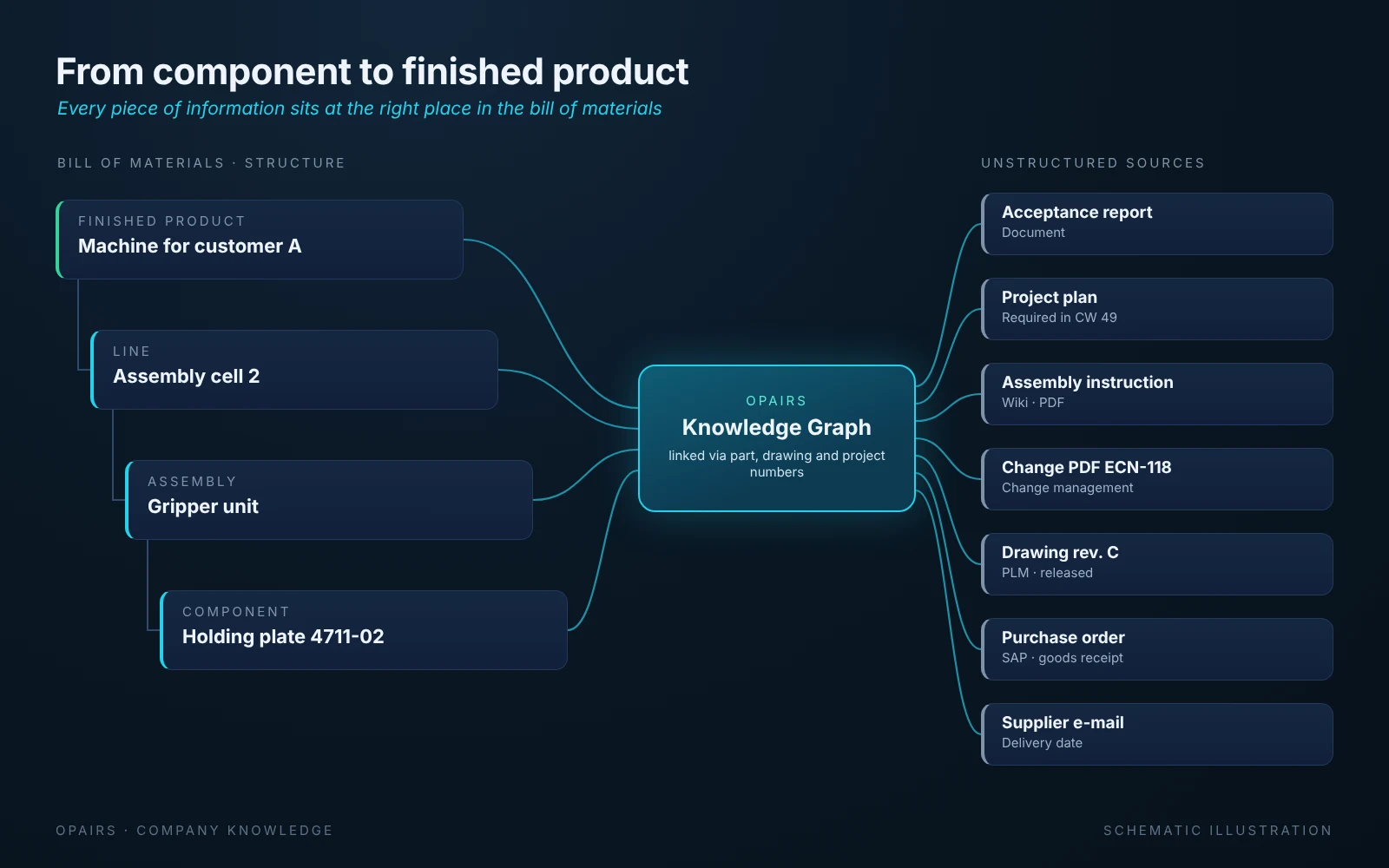
Every manufacturer already has a structure along which its knowledge can be organised: the bill of materials. It describes how components become assemblies, assemblies become lines and lines become the finished product delivered to the customer. OPAIRS takes this structure from ERP and PLM and uses it as the backbone for everything that is otherwise scattered.
- Component level: drawing and release status, purchase order, confirmed delivery date and goods receipt, supplier correspondence, inspection plans and reports
- Assembly level: assembly instructions, picking lists, engineering change notices, open points from assembly and quality assurance
- Line level: project plan and required dates, commissioning reports, interfaces to other trades
- Finished product: acceptance reports, revision installed at the customer, service cases
Attaching unstructured data in the right place
Most knowledge does not live in tables but in documents: change PDFs, drawings, wiki pages, Teams minutes, inspection reports and e-mails. OPAIRS ingests this content automatically and recognises the anchors that connect it to the bill of materials: part numbers, drawing numbers, change numbers and project and WBS numbers. In the Knowledge Graph this becomes a network in which a change notice no longer sits somewhere on a drive but is attached to exactly the components and assemblies it affects. Every AI answer points to its source, so the worker is one click away from the original document.
Reconciling with the plan
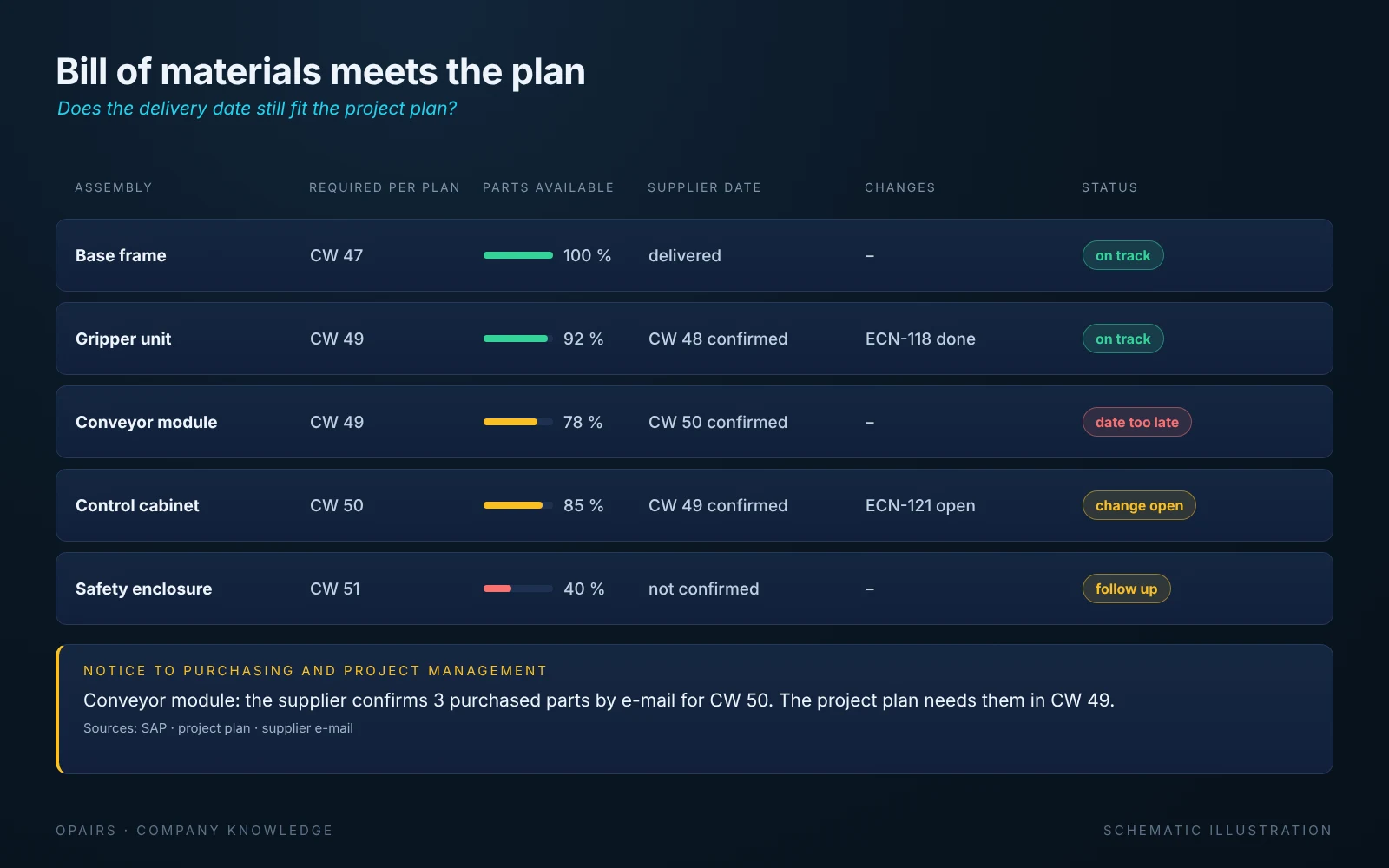
Purchasing: does the delivery date still fit the project plan?
For purchasing, OPAIRS reconciles every open order with the project plan. Next to the required date of the assembly sits the delivery date the supplier has confirmed, from the order confirmation in the ERP or from the supplier’s e-mail. If the supplier moves the date beyond the requirement, purchasing immediately sees which assembly and which project are affected. It can follow up, ask another supplier or replan with project management before assembly stops. Orders without a confirmation become visible too, so follow-ups happen in time.
Our use case from special machine building shows how this reconciliation works in project business: OPAIRS combined the plan with the actual status from SAP, PLM and Teams and made the critical path visible, with up to 15 % less search time and reporting effort: https://opairs-systems.com/en/insights/sondermaschinenbau-kritischer-pfad-on-premise
Quality assurance and order picking
Quality assurance inspects against the right revision: at the component, it sees which drawing revision and which changes apply, which inspection plan belongs to it and which defects have already occurred with this component or this supplier. Inspection reports and complaints are in turn attached to component, assembly and supplier. Purchasing and engineering thus recognise recurring problems without anyone compiling the reports by hand.
According to the Hamburg study, order picking has the highest share of search time. From the linked bill of materials, a picking kit is created for each assembly and required date: which parts in which revision belong to it, what is already in stock and what is still missing. Missing parts are known before the kit goes to assembly, not when assembly starts looking for them.
Transparency from assembly to engineering
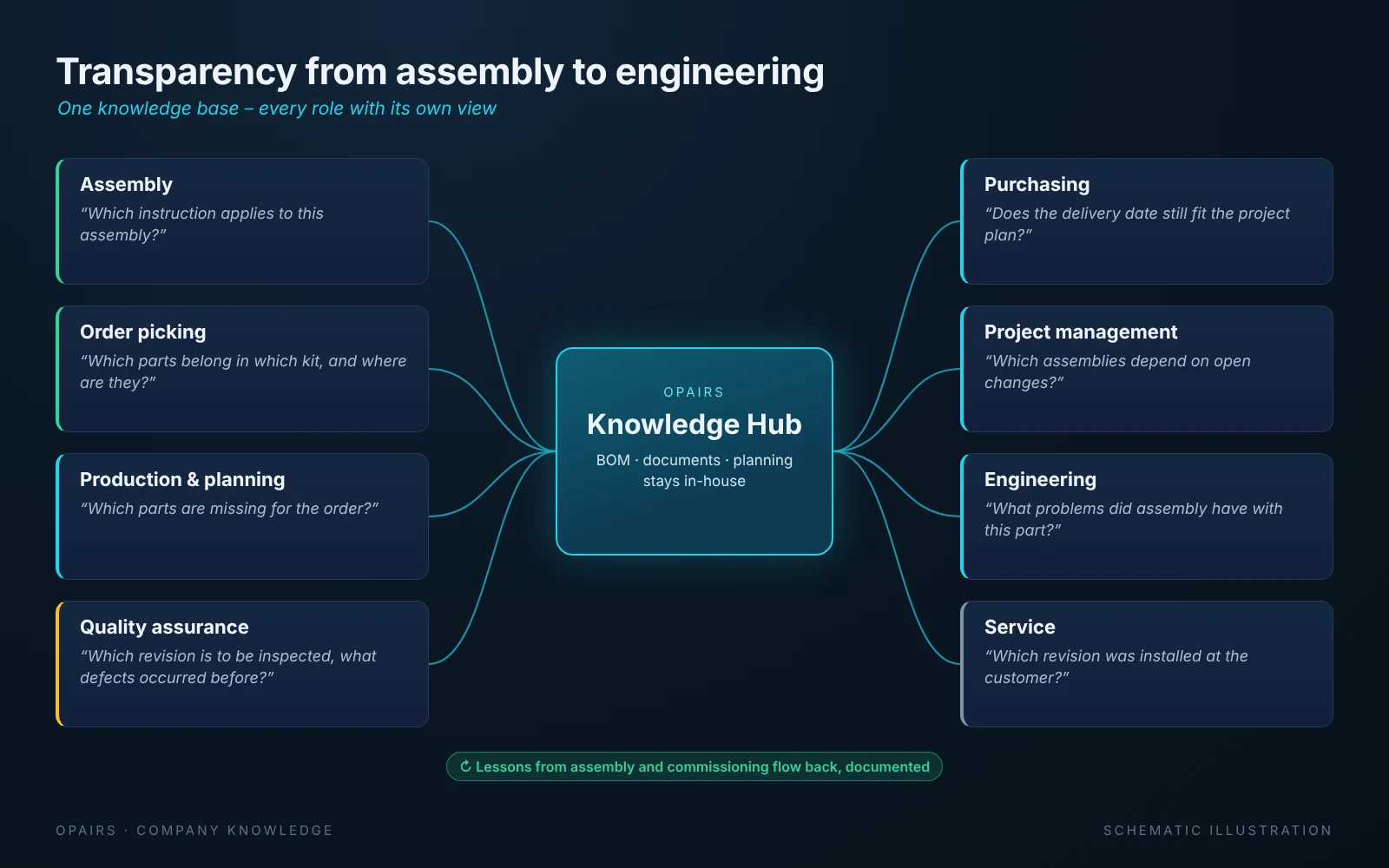
One knowledge base, every role with its own view
Because everyone works on the same linked data, every role gets the answers it needs. Assembly asks for the valid instruction, order picking for the complete parts kit, production planning for missing parts, quality assurance for the revision to inspect, purchasing whether the delivery date still fits the project plan, and project management for assemblies with open changes. And engineering sees which problems assembly had with a component without anyone having to write a report. Queries between departments become rarer, and meetings focus on solutions instead of on who has which status.
Your own knowledge base on processes and production workflows
With every project, a body of knowledge grows that previously existed only in the heads of experienced staff: which assemblies regularly cause problems in assembly, which changes had which consequences, which production workflows have proven themselves and where commissioning keeps getting stuck. OPAIRS stores this knowledge in a structured way, along the bill of materials and the process steps, and makes it available for the next project. The knowledge stays in the company even when experienced colleagues retire or move on, and new employees find their way faster.
A basis for quotation costing
The same structure helps before the order is even placed. Anyone costing a new quotation today digs through old projects for comparable assemblies, the hours actually spent and the latest purchase prices. In the industrial knowledge base, this information is attached to the bill of materials: what did a similar gripper unit cost last time, how many assembly hours were really needed, which changes were added after the order was placed? Costing is then based on actual data from completed projects instead of estimates, and experience is not lost when the experienced estimator is unavailable.
Data sovereignty: the knowledge stays in-house
Drawings, changes and supplier correspondence are at the core of the company. That is why OPAIRS runs fully on-premise: data lake, Knowledge Graph and language models run on the company’s own hardware inside its network, with no data going to external services. Existing systems stay as they are; OPAIRS reads from ERP, PLM, network drives and planning tools instead of replacing them.
Status: what runs today and what is in progress
- In use: ingesting bills of materials from SAP and PLM, project documents such as change PDFs and wiki pages, Teams Planner data and Excel planning into the Knowledge Hub, and queries via the OPAIRview agent with source references
- In progress: including e-mails. They contain names and other personal data and will therefore only be ingested with a dedicated filter (guardrail)
- Built together with the customer: quotation costing based on completed projects. It requires the bill of materials, hours and purchase prices to be linked across several projects
- Tailored per company: which numbering schemes serve as anchors and which sources are connected, such as a CAQ system for quality assurance or warehouse management for order picking, is defined together during the on-site analysis
Part of the OPAIRS platform
The Knowledge Hub is the knowledge layer of the pipeline we described in “Industrial AI Pipeline: From Data to AI Recommendation”: https://opairs-systems.com/en/insights/opairs-pipeline-von-daten-zu-entscheidungen
Conclusion: structured knowledge saves search time and tokens
Structuring knowledge along the bill of materials pays off twice. Employees no longer have to search, and neither does the AI. Because the bill of materials, document references and planning are stored in a structured, efficient way, the company’s own SQL-specialised model answers a question with a targeted query. It fetches exactly the records it needs instead of loading entire stacks of documents into the context. Shorter contexts mean fewer tokens per request, faster answers and less load on the company’s own hardware.
And because the model runs locally, these tokens carry no per-request fees. Our TCO analysis against cloud API services arrives at up to 2× lower total cost over 4 years, depending on the number of users and usage intensity. The more employees use AI, the bigger the gap: cloud costs grow with every request, yours stay fixed. The full calculation: https://opairs-systems.com/en/insights/tco-on-premise-ki-vs-cloud-api
Which process costs you the most time today? In 30 minutes you will know whether, and where, your own AI pays off for your company – honestly, even if the answer is “not yet”. Everything at a glance: https://opairs-systems.com/en/at-a-glance
Waiting is a decision too. Write to us: office@opairs-systems.com
More insights
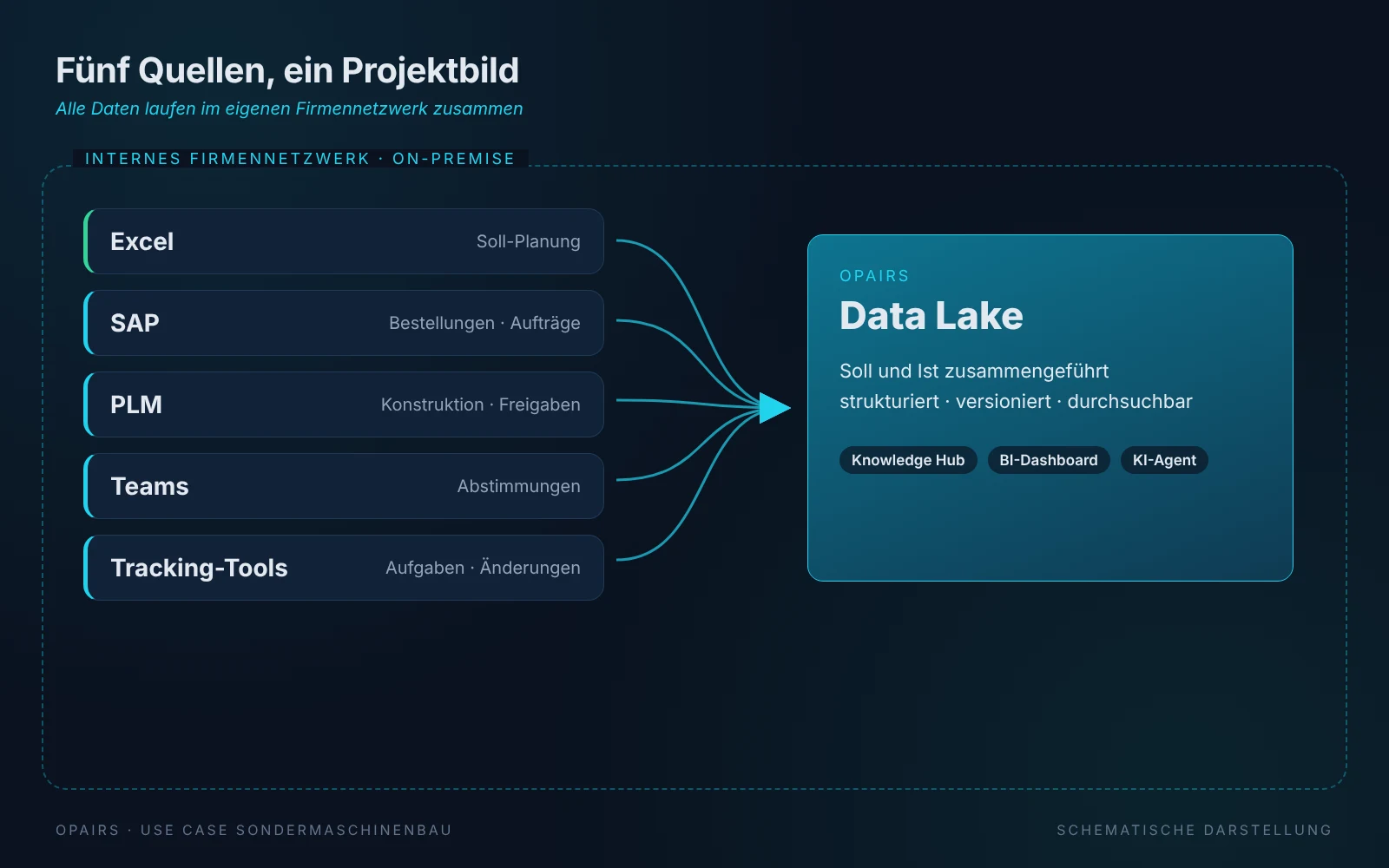
From Excel Plan to Critical Path: How a Special Machinery Builder Manages Its Projects On-Premise
The project plan lives in Excel, while the actual status is spread across SAP, PLM, Teams and the lists kept by each department. A special machinery builder with around 100 million euros in revenue brings both together with OPAIRS: plan and actuals are compared, the critical path becomes visible and the AI derives recommendations. The result: up to 10% fewer project hours and up to 15% less search time. All data stays in-house.
Read article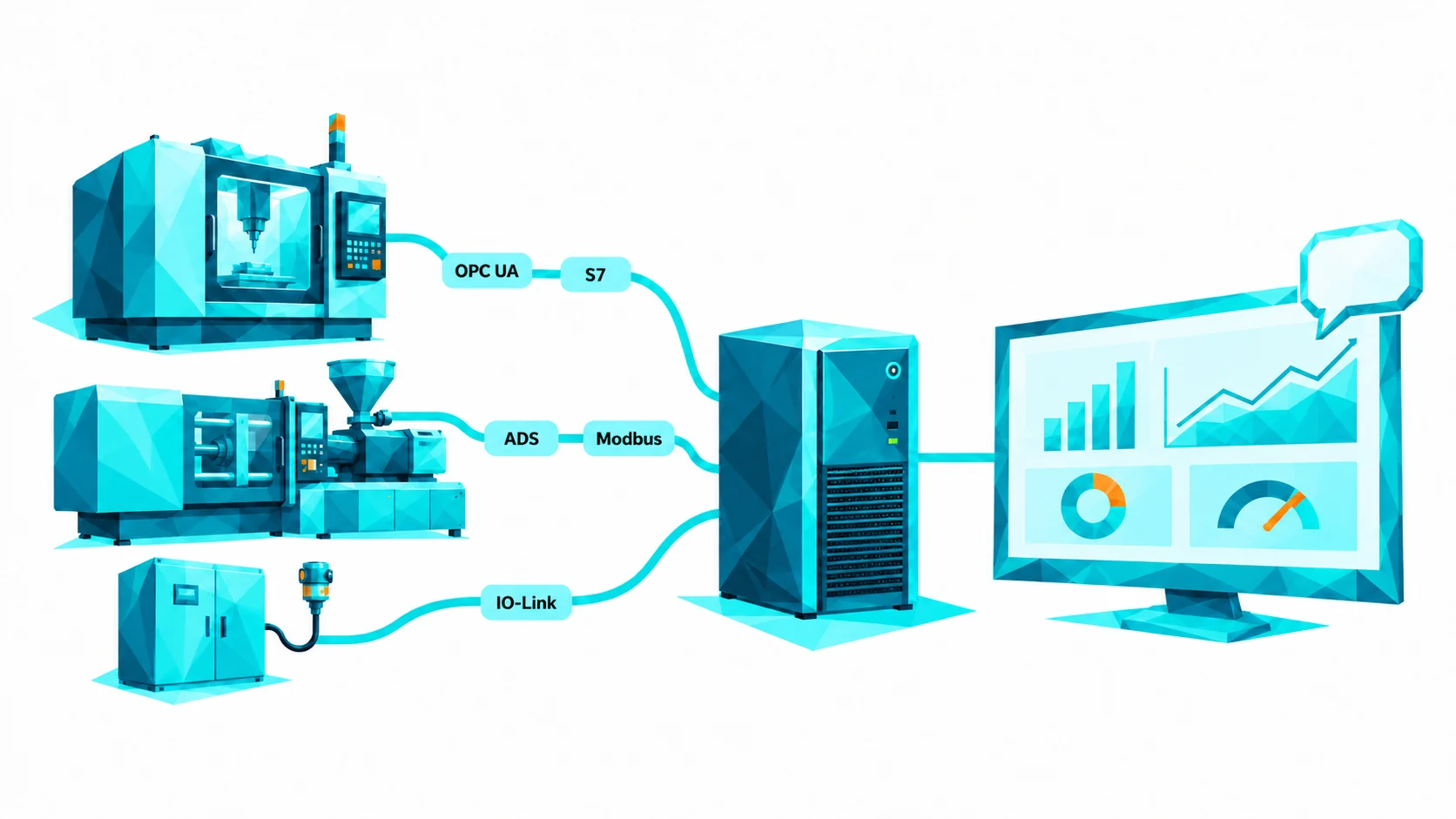
Cyber-Physical Systems with OPAIRS®: Connecting Machines and Sensors On-Premise
So far, OPAIRS has learned from ERP systems, documents and databases. With OPAIRS Connect Machine, the machines themselves join in: controllers, sensors and equipment deliver their values via OPC UA, Siemens S7, Beckhoff TwinCAT, Modbus, EtherNet/IP or IO-Link into a local database that the OPAIRS® Dashboard and AI agents read from. Everything runs in-house, without the cloud and without a connection to external services.
Read article